Engineering Database Modernization & Arena PLM Rollout
/plm_migration
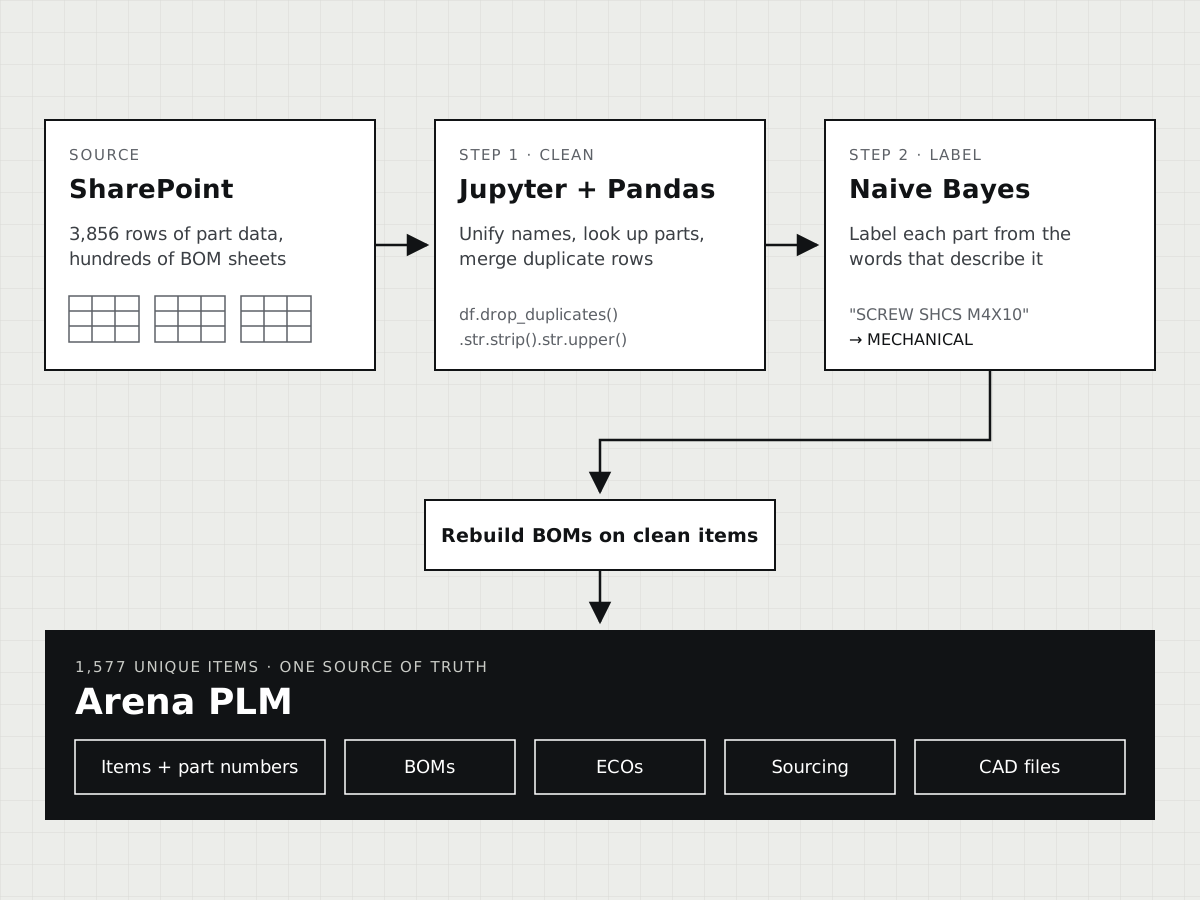
Years of part records lived in SharePoint, in lists and spreadsheets that never quite agreed with each other. I cleaned 3,856 rows of them down to 1,577 real parts with a pair of Jupyter notebooks, moved them into Arena PLM, and set up the release process that design, quality, and production now share.
- Where
- Myriad Genetics, Hardware Automation
- Scale
- 3,856 rows in, 1,577 unique items out
- Result
- Weeks of manual entry cut to minutes per run
Tools & skills
- PLM
- Arena PLM: items, BOMs, change orders (ECOs), sourcing, spreadsheet import
- Data
- Python, Jupyter, Pandas, scikit-learn (multinomial Naive Bayes), Selenium, Matplotlib, VBA
- CAD
- SOLIDWORKS, Onshape
- Rollout
- Workflow design, numbering and naming rules, user training
Many copies of the truth
Ask three people for the current revision of a bracket, and you could get three answers. Part data lived in SharePoint lists, in hundreds of BOM spreadsheets, and in a folder tree with one folder per product and revision. None of it was linked. When a part changed, someone had to remember every place it appeared.
When I exported everything into one table, the drift was easy to measure. The export had 3,856 rows, but many were the same part entered more than once. 42% of rows had no manufacturer and 66% had no manufacturer part number. Company names came in every spelling people had ever typed:
- ‘Digi-Key’‘DigiKey’‘Digikey’
- ‘Automation Direct’‘Automation direct’‘AutomationDirect’
- ‘Compass’‘Compass ’‘Copasss’
- ‘3D Print’‘3d print’‘3D Printer’‘None - 3D print only’
Real alias groups from the cleanup notebook (one has a trailing space). Each row became a single company name.
The department chose Arena PLM to fix that: one cloud system where every part, assembly, change, and supplier lives once. The catch was getting the records into it clean.
What moved, and where it landed
A PLM system holds more than a parts list. Arena ties together the three jobs below, which used to live in separate files.
- PDMProduct data management
- Before, in SharePointPart numbers, revisions, and CAD files kept in SharePoint lists and a numbered folder tree, each updated by hand.
- After, in ArenaEvery part is an Arena item with one part number, a revision history, its CAD files, and the BOMs it belongs to.
- ECOEngineering change orders
- Before, in SharePointA new revision meant a new folder, and someone had to remember every list that pointed at the old one.
- After, in ArenaA change order lists the affected items and routes to design, quality, and production for sign-off before the new revision is released.
- SourcingManufacturers and suppliers
- Before, in SharePointThe same company appeared under several spellings, sometimes as a manufacturer in one place and a vendor in another.
- After, in ArenaEach item carries its manufacturer and supplier part numbers, pulled from one shared list of companies.
Weeks by hand, minutes by script
Arena imports items and BOMs from spreadsheets, but only clean ones: one row per part, consistent columns, and every BOM line pointing at a part that exists. Fixing thousands of rows into that shape by hand would have taken weeks, and the source data kept changing while I worked.
So I wrote the cleanup as code in two Jupyter notebooks, one for the item list and one for the BOMs. Every fix is a line I can read and rerun. When a new export came out of SharePoint, a full run from raw export to import-ready files took minutes.
- 01GatherLoad the full SharePoint item export (3,856 rows, 55 columns) into one Pandas table and measure how much of each column was empty.
- 02StandardizeCollapse every spelling of a company into one name, fix part numbers typed into the wrong column, and normalize case and spacing.
- 03EnrichLook up McMaster-Carr part numbers on McMaster’s site with a headless browser to replace vague names like “bracket” with the catalog name, and flag discontinued parts with their replacements.
- 04ConsolidateWhere several rows described the same part, keep the most complete one. 3,856 rows became 1,577 unique items.
- 05LabelCopy categories over from an earlier labeled export by matching part numbers, then let a Naive Bayes classifier label the rest.
- 06Rebuild BOMsIn a second notebook, match every line of the master BOM back to the clean item list, so each BOM points at a part that exists.
- 07ExportWrite the clean item list and BOM list as CSV files laid out for Arena’s import.
Letting a model fill in the blanks
Arena sorts every item into a category: mechanical, electrical, plumbing, and so on. Most old records had no category at all. I started with the easy ones. An earlier export already had categories for many parts, so I copied those over wherever the part numbers matched.
That left 488 McMaster-Carr parts with no match anywhere. But their names and descriptions already hinted at the answer. A part called “socket head screw” from McMaster is probably mechanical; one with “terminal block” or “AWG” is probably electrical. A Naive Bayes classifier learns exactly that. It counts how often each word appears in each category across the labeled parts, then scores a new part against every category and picks the best fit. I fed it the item name, description, manufacturer, and vendor.
It is one of the simplest models in machine learning, and that suited the job. It trains in seconds on a couple of thousand rows, and you can see which words drove each guess. On 10% of the labeled parts that I held back from training, it picked the right category 85% of the time (weighted F1 score 0.85). Most of its misses mixed up assemblies and mechanical parts, which share a lot of vocabulary. For a top-level field on 488 parts, that traded a little accuracy for a lot of time.
One release path for everyone
Moving the data was half the job. The other half was keeping it clean. With the records in Arena, I set up the release workflow around change orders. A designer opens an ECO that lists the parts and drawings being changed. Quality and production each review it and sign off. Only then is the new revision released, and everyone who opens that part sees the same version.
Alongside the workflow came the rules that keep drift from creeping back: a numbering scheme, naming conventions, and one shared list of manufacturers and suppliers, so “Digikey” can't sneak back in. I trained the engineers who use Arena day to day, so the new process was the easy path rather than one more thing to remember.
This project is also where I started treating scripts as the main tool for engineering admin work. I wrote more about that in the first post of my CAD × Claude Code series.